
2027年新疆职业院校技能大赛网络系统管理赛项(GZ046)模拟赛题第1套参考答案与解析本套题为根据历年赛题进行深度考点解析和出题,并解析
(配置命令 · 验证命令 · 考点解析)
答案使用说明
本参考答案对应第1套赛题(天山棉业集团),与模块A、模块B任务清单一一对应。网络设备统一采用华为设备(华为 AR 系列·CE 系列·USG6000 系列(网络虚拟化竞技平台)),全部给出华为VRP命令行配置;Windows Server 2019 给出图形界面路径与PowerShell命令;统信UOS服务器版V20给出Debian系命令(apt/systemctl/配置文件路径),与UOS服务器版实际环境一致。
每项任务包含三部分:①配置命令——可直接在设备上逐行执行的完整配置;②验证命令——display/查询类命令,用于确认配置生效;③【解析】——该考点的原理、参数含义与常见失分点。注释行以“#”开头,不参与设备执行。
约定:[<>]内为视图提示;接口编号、IP地址与附录1拓扑图、附录2地址规划表一致;若现场设备版本与本文命令存在个别差异(如USG6000带宽管理、Portal认证等命令随版本微调),请以设备实际命令补全(?)提示为准,配置思路与参数不变。
模块A 网络构建 参考答案与解析
场景:天山棉业集团(总部 + 喀什分部,CE交换机/AR路由器/USG6000防火墙)。以下按任务清单顺序给出全部配置命令、验证命令与解析。

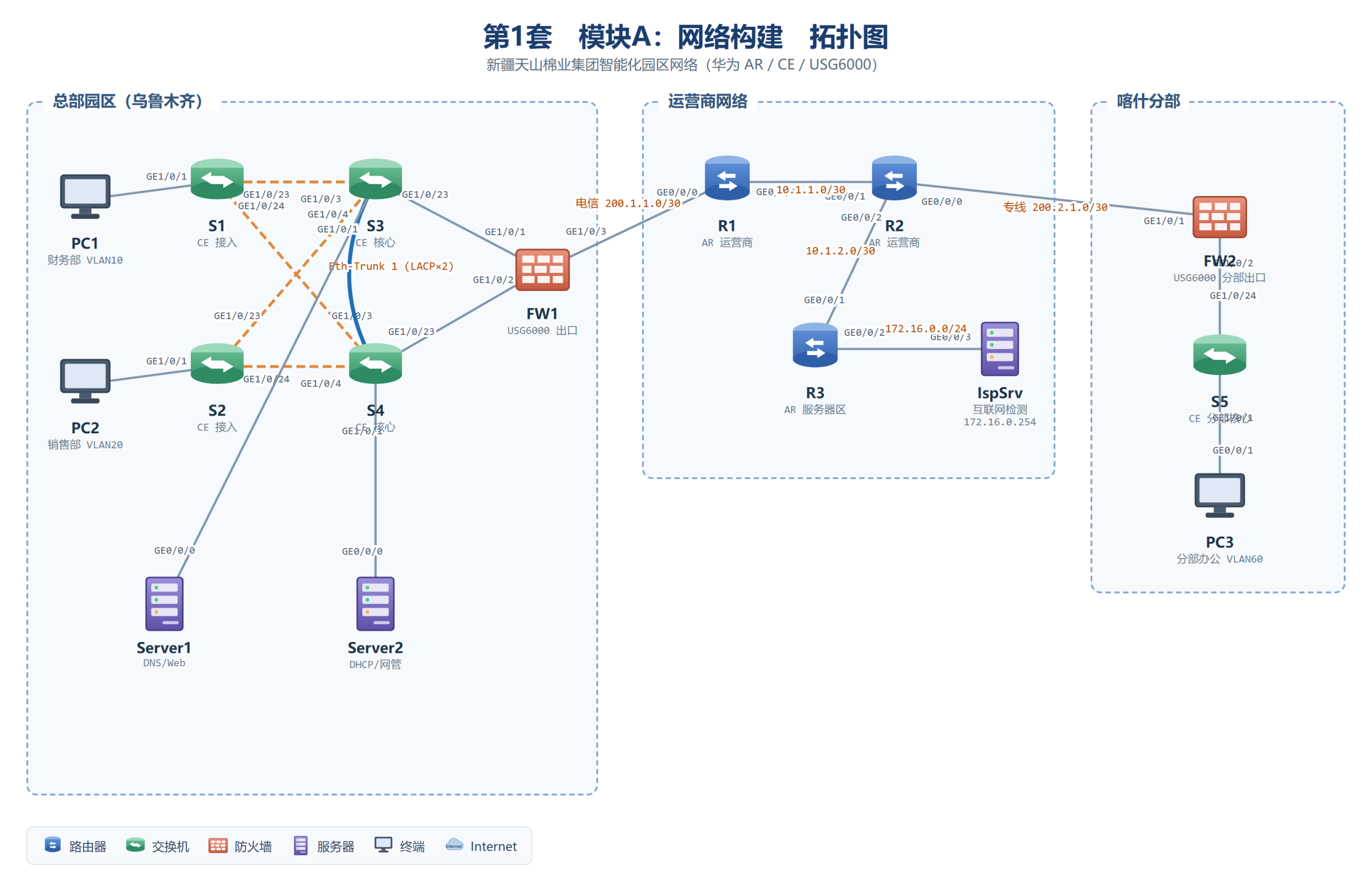
图A-1 第1套模块A拓扑(与题面附录1一致,供对照接口编号)
(一)基础配置
任务1 设备命名、接口地址与描述
【考点】设备命名规范、接口IP配置(附录2)、互联接口description规范书写。
【解析】CE交换机三层互联口使用 undo portswitch 转为路由口再配IP;描述统一“本端接口—对端设备/接口”格式,便于排障时快速定位链路。
▍S1(CE接入交换机)
system-view
sysname TSMY-JR-S1
interface GigabitEthernet1/0/1
description To-PC1
interface GigabitEthernet1/0/23
description To-S3_GE1/0/3
interface GigabitEthernet1/0/24
description To-S4_GE1/0/3
quit
▍S2(CE接入交换机)
system-view
sysname TSMY-JR-S2
interface GigabitEthernet1/0/1
description To-PC2
interface GigabitEthernet1/0/23
description To-S3_GE1/0/4
interface GigabitEthernet1/0/24
description To-S4_GE1/0/4
quit
▍S3(CE核心交换机)
system-view
sysname TSMY-HX-S3
interface Vlanif10
ip address 192.168.10.252 255.255.255.0
interface Vlanif20
ip address 192.168.20.252 255.255.255.0
interface Vlanif30
ip address 192.168.30.252 255.255.255.0
interface Vlanif40
ip address 192.168.40.252 255.255.255.0
interface Vlanif100
ip address 192.168.100.1 255.255.255.0
interface GigabitEthernet1/0/1
description To-Server1
interface GigabitEthernet1/0/21
description To-S4_GE1/0/21_Eth-Trunk1
interface GigabitEthernet1/0/22
description To-S4_GE1/0/22_Eth-Trunk1
interface GigabitEthernet1/0/23
description To-FW1_GE1/0/1
undo portswitch
ip address 10.1.0.2 255.255.255.252
quit
▍S4(CE核心交换机)
system-view
sysname TSMY-HX-S4
interface Vlanif10
ip address 192.168.10.253 255.255.255.0
interface Vlanif20
ip address 192.168.20.253 255.255.255.0
interface Vlanif30
ip address 192.168.30.253 255.255.255.0
interface Vlanif40
ip address 192.168.40.253 255.255.255.0
interface Vlanif100
ip address 192.168.100.2 255.255.255.0
interface GigabitEthernet1/0/1
description To-Server2
interface GigabitEthernet1/0/21
description To-S3_GE1/0/21_Eth-Trunk1
interface GigabitEthernet1/0/22
description To-S3_GE1/0/22_Eth-Trunk1
interface GigabitEthernet1/0/23
description To-FW1_GE1/0/2
undo portswitch
ip address 10.1.0.6 255.255.255.252
quit
▍S5(CE分部核心交换机)
system-view
sysname TSMY-FB-S5
interface Vlanif60
ip address 192.168.60.1 255.255.255.0
interface GigabitEthernet1/0/1
description To-PC3
interface GigabitEthernet1/0/24
description To-FW2_GE1/0/2
undo portswitch
ip address 10.1.3.2 255.255.255.252
quit
▍FW1(USG6000总部出口防火墙)
system-view
sysname TSMY-HW-FW1
interface GigabitEthernet1/0/1
description To-S3_GE1/0/23
ip address 10.1.0.1 255.255.255.252
interface GigabitEthernet1/0/2
description To-S4_GE1/0/23
ip address 10.1.0.5 255.255.255.252
interface GigabitEthernet1/0/3
description To-R1_GE0/0/0
ip address 200.1.1.2 255.255.255.252
quit
▍FW2(USG6000分部出口防火墙)
system-view
sysname TSMY-FB-FW2
interface GigabitEthernet1/0/1
description To-R2_GE0/0/0
ip address 200.2.1.2 255.255.255.252
interface GigabitEthernet1/0/2
description To-S5_GE1/0/24
ip address 10.1.3.1 255.255.255.252
quit
▍R1 / R2 / R3(AR运营商路由器)
# R1
system-view
sysname R1
interface GigabitEthernet0/0/0
description To-FW1_GE1/0/3
ip address 200.1.1.1 255.255.255.252
interface GigabitEthernet0/0/1
description To-R2_GE0/0/1
ip address 10.1.1.1 255.255.255.252
interface LoopBack0
ip address 1.1.1.1 255.255.255.255
quit
# R2
sysname R2
interface GigabitEthernet0/0/0
description To-FW2_GE1/0/1
ip address 200.2.1.1 255.255.255.252
interface GigabitEthernet0/0/1
description To-R1_GE0/0/1
ip address 10.1.1.2 255.255.255.252
interface GigabitEthernet0/0/2
description To-R3_GE0/0/1
ip address 10.1.2.1 255.255.255.252
interface LoopBack0
ip address 2.2.2.2 255.255.255.255
quit
# R3
sysname R3
interface GigabitEthernet0/0/1
description To-R2_GE0/0/2
ip address 10.1.2.2 255.255.255.252
interface GigabitEthernet0/0/2
description To-IspSrv_GE0/0/3
ip address 172.16.0.1 255.255.255.0
interface LoopBack0
ip address 3.3.3.3 255.255.255.255
quit
▍验证命令
display ip interface brief
display current-configuration interface GigabitEthernet 1/0/23
任务2 全网开启SSH服务(admin/Admin@123,最别,super密码admin1234)
【考点】STelnet安全登录、AAA本地用户、用户级别、super密码(明文)。
▍CE/AR 设备统一模板(每台执行,以 S3 为例)
system-view
stelnet server enable
rsa local-key-pair create # 启用时按提示输入密钥位数:2048
ssh user admin
ssh user admin authentication-type password
ssh user admin service-type stelnet
user-interface vty 0 4
authentication-mode aaa
protocol inbound ssh
quit
aaa
local-user admin password irreversible-cipher Admin@123
local-user admin privilege level 15
local-user admin service-type ssh
quit
super password level 15 simple admin1234
# 注:simple 表示明文存储;若设备强制要求加密形式,则改用 cipher 并在报告中说明
▍USG6000 差异写法(FW1/FW2)
system-view
stelnet server enable
ssh user admin
ssh user admin authentication-type password
ssh user admin service-type stelnet
user-interface vty 0 4
authentication-mode aaa
quit
aaa
manager-user admin
password Admin@123
level 15
service-type ssh
quit
▍验证命令
display ssh server status
display ssh user-information
# 客户端测试:ssh admin@10.1.0.2(登录需 ssh client first-time enable)
任务3 交换设备SNMP(V2C,读public/写Test,Trap发往192.168.100.12)
【考点】SNMP Agent、团体字读写权限、Trap目标主机与版本。
# 在 S1~S5 每台执行
system-view
snmp-agent
snmp-agent community read public
snmp-agent community write Test
snmp-agent sys-info version v2c
snmp-agent target-host trap address udp-domain 192.168.100.12 params securityname public v2c
snmp-agent trap enable
【解析】community read/write 分别对应只读与读写团体字;target-host 指定Trap接收者与securityname,版本声明 v2c 与题面一致;Trap 用于设备告警(接口Up/Down等)主动上报。
▍验证命令
display snmp-agent community
display snmp-agent trap-list
任务4 全网NTP客户端同步
# 企业侧设备 S1~S5、FW1、FW2(同步Server2)
system-view
ntp-service unicast-server 192.168.100.12
# 运营商设备 R1、R2、R3(同步IspSrv)
system-view
ntp-service unicast-server 172.16.0.254
▍验证命令
display ntp-service status
display ntp-service sessions
任务5 互联网访问检测验证
【解析】全网路由打通后,在总部/分部PC上浏览器访问 http://172.16.0.254 应显示检测页;设备侧可 ping 172.16.0.254 验证。该任务是对整网连通性的最终检验,建议最后复核。
(二)交换网络配置
任务1 VLAN划分与Trunk修剪
【考点】Access/Trunk端口、port trunk allow-pass 精确放行(VLAN修剪)。
▍S1
system-view
vlan batch 10
interface GigabitEthernet1/0/1
port link-type access
port default vlan 10
interface GigabitEthernet1/0/23
port link-type trunk
port trunk allow-pass vlan 10
interface GigabitEthernet1/0/24
port link-type trunk
port trunk allow-pass vlan 10
quit
▍S2
system-view
vlan batch 20
interface GigabitEthernet1/0/1
port link-type access
port default vlan 20
interface GigabitEthernet1/0/23
port link-type trunk
port trunk allow-pass vlan 20
interface GigabitEthernet1/0/24
port link-type trunk
port trunk allow-pass vlan 20
quit
▍S3
system-view
vlan batch 10 20 30 40 100
interface GigabitEthernet1/0/1
port link-type access
port default vlan 100
interface GigabitEthernet1/0/3
port link-type trunk
port trunk allow-pass vlan 10
interface GigabitEthernet1/0/4
port link-type trunk
port trunk allow-pass vlan 20
quit
▍S4
system-view
vlan batch 10 20 30 40 100
interface GigabitEthernet1/0/1
port link-type access
port default vlan 100
interface GigabitEthernet1/0/3
port link-type trunk
port trunk allow-pass vlan 20
interface GigabitEthernet1/0/4
port link-type trunk
port trunk allow-pass vlan 10
quit
▍S5
system-view
vlan batch 60
interface GigabitEthernet1/0/1
port link-type access
port default vlan 60
quit
【解析】修剪原则:Trunk仅放行该链路上确有流量需求的VLAN。S1只接PC1(VLAN10),其两条上行Trunk只放行VLAN10;S2同理放行VLAN20。S3-S4间Eth-Trunk需承载全部业务VLAN。服务器口Server1/Server2接在S3/S4的GE1/0/1(Access VLAN100)。
▍验证命令
display vlan
display port vlan
任务2 S3–S4 链路聚合 Eth-Trunk 1(LACP动态、基于源目IP负载分担)
解析图1 MSTP多实例主备根(本套实例划分见图示)
【考点】Eth-Trunk、LACP模式 lacp-static、load-balance 字段选择。
# S3 与 S4 相同
system-view
interface Eth-Trunk 1
mode lacp-static
load-balance src-dst-ip
port link-type trunk
port trunk allow-pass vlan 10 20 30 40 100
quit
interface GigabitEthernet1/0/21
eth-trunk 1
interface GigabitEthernet1/0/22
eth-trunk 1
quit
【解析】mode lacp-static 为LACP动态协商(对端需一致);两端成员口必须在加入Eth-Trunk前清空原有链路类型配置。load-balance src-dst-ip 按源目IP哈希分担,适合主机间大流量。
▍验证命令
display eth-trunk 1
display lacp statistics eth-trunk 1
任务3 MSTP多实例(域名TSMY,实例1=VLAN10/20,实例2=VLAN30/40/100)
【考点】MST域三要素(域名/修订号/VLAN映射)、实例优先级4096/8192、主从根规划。
# S1、S2、S3、S4 全部执行(域配置必须完全一致)
system-view
stp mode mstp
stp region-configuration
region-name TSMY
revision-level 1
instance 1 vlan 10 20
instance 2 vlan 30 40 100
active region-configuration
quit
# S3:实例1主根、实例2从根
stp instance 1 priority 4096
stp instance 2 priority 8192
# S4:实例2主根、实例1从根
stp instance 2 priority 4096
stp instance 1 priority 8192
【解析】同一MST域要求域名、修订级别、VLAN与实例映射三者一致,否则跨域计算根桥。优先级取值必须为4096的倍数。实例1流量走S3(主根),实例2走S4,互为备份实现负载分担。
▍验证命令
display stp brief
display stp region-configuration
display stp instance 1 root
任务4 接入端口边缘端口+BPDU保护(S1/S2)
# S1 GE1/0/1、S2 GE1/0/1
interface GigabitEthernet1/0/1
stp edged-port enable
stp bpdu-protection
quit
【解析】边缘端口不参与生成树计算、直接进入转发,端口收到BPDU即触发BPDU保护将其error-down,防止私接交换机引起环路。恢复需 undo shutdown 或配置自动恢复。
任务5 DHCP Snooping(S1/S2,仅信任上行口)
解析图3 DHCP Snooping信任端口与绑定表
# S1(S2 同理,VLAN 改为 20)
system-view
dhcp enable
dhcp snooping enable
vlan 10
dhcp snooping enable
quit
interface GigabitEthernet1/0/23
dhcp snooping trusted
interface GigabitEthernet1/0/24
dhcp snooping trusted
quit
【解析】全局+VLAN两级开启后,非信任端口收到的DHCP OFFER/ACK被丢弃,杜绝私设DHCP;上行口朝向真实服务器必须显式 trusted,否则合法OFFER也被丢弃、用户获取不到地址。
▍验证命令
display dhcp snooping configuration
display dhcp snooping user-bind all
任务6 DHCP中继(S3/S4 VLANIF10~40 → Server2)
# S3、S4 全部业务VLANIF执行(先全局 dhcp enable)
system-view
dhcp enable
interface Vlanif10
dhcp select relay
dhcp relay server-ip 192.168.100.12
quit
# VLANIF20/30/40 重复上述两条视图命令
# 注:VLANIF100为服务器/管理网段,无需中继
【解析】中继把广播式DHCP请求以单播转发给跨网段服务器;gateway-list由接口IP自动填充,服务器据此从对应地址池分配。Server2侧需配置与各网段匹配的地址池。
▍验证命令
display dhcp relay interface vlanif 10
# PC1 侧 ipconfig /renew 应获取 192.168.10.0/24 地址
任务7 VRRP冗余(优先级150/120,track联动Eth-Trunk1)
解析图2 VRRP主备与上行接口Track联动
【考点】VRRP备份组、优先级、抢占、track接口联动降低优先级。
# S3(VLAN10/20 的 Master,VLAN30/40/100 的 Backup)
system-view
interface Vlanif10
vrrp vrid 10 virtual-ip 192.168.10.254
vrrp vrid 10 priority 150
vrrp vrid 10 track interface Eth-Trunk 1 reduced 30
interface Vlanif20
vrrp vrid 20 virtual-ip 192.168.20.254
vrrp vrid 20 priority 150
vrrp vrid 20 track interface Eth-Trunk 1 reduced 30
interface Vlanif30
vrrp vrid 30 virtual-ip 192.168.30.254
vrrp vrid 30 priority 120
interface Vlanif40
vrrp vrid 40 virtual-ip 192.168.40.254
vrrp vrid 40 priority 120
interface Vlanif100
vrrp vrid 100 virtual-ip 192.168.100.254
vrrp vrid 100 priority 120
quit
# S4(与S3镜像:VLAN30/40/100 优先级150,VLAN10/20 优先级120)
interface Vlanif30
vrrp vrid 30 virtual-ip 192.168.30.254
vrrp vrid 30 priority 150
vrrp vrid 30 track interface Eth-Trunk 1 reduced 30
interface Vlanif40
vrrp vrid 40 virtual-ip 192.168.40.254
vrrp vrid 40 priority 150
vrrp vrid 40 track interface Eth-Trunk 1 reduced 30
interface Vlanif100
vrrp vrid 100 virtual-ip 192.168.100.254
vrrp vrid 100 priority 150
vrrp vrid 100 track interface Eth-Trunk 1 reduced 30
interface Vlanif10
vrrp vrid 10 virtual-ip 192.168.10.254
vrrp vrid 10 priority 120
interface Vlanif20
vrrp vrid 20 virtual-ip 192.168.20.254
vrrp vrid 20 priority 120
quit
【解析】VRRP组号与VLAN号一致便于核对;虚拟IP即终端。track联动:Master的Eth-Trunk1故障时优先级150-30=120,等于Backup值,配合抢占完成切换。主备状态与MSTP实例主根一致(VLAN10/20→S3,VLAN30/40/100→S4),保证二层三层路径同向。
▍验证命令
display vrrp brief
display vrrp interface vlanif 10
任务8 IPv6 SLAAC + VRRP6
解析图5 IPv6无状态自动配置与VRRP6
# 全网交换机先全局使能IPv6
system-view
ipv6
# S3(S4 同理,地址改为 ::253,优先级镜像)
interface Vlanif10
ipv6 enable
ipv6 address 2001:192:10::252 64
undo ipv6 nd ra halt
vrrp ipv6 vrid 10 virtual-ip FE80::1 link-local
vrrp ipv6 vrid 10 virtual-ip 2001:192:10::254
vrrp ipv6 vrid 10 priority 150
interface Vlanif20
ipv6 enable
ipv6 address 2001:192:20::252 64
undo ipv6 nd ra halt
vrrp ipv6 vrid 20 virtual-ip FE80::1 link-local
vrrp ipv6 vrid 20 virtual-ip 2001:192:20::254
vrrp ipv6 vrid 20 priority 150
interface Vlanif30
ipv6 enable
ipv6 address 2001:192:30::252 64
undo ipv6 nd ra halt
vrrp ipv6 vrid 30 virtual-ip FE80::1 link-local
vrrp ipv6 vrid 30 virtual-ip 2001:192:30::254
vrrp ipv6 vrid 30 priority 120
interface Vlanif40
ipv6 enable
ipv6 address 2001:192:40::252 64
undo ipv6 nd ra halt
vrrp ipv6 vrid 40 virtual-ip FE80::1 link-local
vrrp ipv6 vrid 40 virtual-ip 2001:192:40::254
vrrp ipv6 vrid 40 priority 120
quit
# S4 对应 VLANIF30/40 优先级 150,VLANIF10/20 优先级 120(镜像配置)
【解析】undo ipv6 nd ra halt 打开RA通告,PC据此无状态自动生成地址(SLAAC)。VRRP6必须先配link-local虚拟地址再配全球单播虚拟地址;主备与IPv4 VRRP保持一致。
▍验证命令
display ipv6 interface vlanif 10
display vrrp6 brief
(三)路由网络配置
任务1 OSPF多进程(总部进程10,分部进程20,直连重发布Type1)
解析图4 OSPF多进程/IS-IS骨干/BGP互联与路由引入
【考点】OSPF进程与区域、import-route直连、外部路由类型Type1、BFD for OSPF。
# S3
system-view
ospf 10 router-id 3.3.3.3
area 0.0.0.0
network 10.1.0.0 0.0.0.3
quit
import-route direct type 1
# S4
ospf 10 router-id 4.4.4.4
area 0.0.0.0
network 10.1.0.4 0.0.0.3
quit
import-route direct type 1
# FW1
ospf 10 router-id 10.1.0.1
area 0.0.0.0
network 10.1.0.0 0.0.0.7
quit
# S5
ospf 20 router-id 5.5.5.5
area 0.0.0.0
network 10.1.3.0 0.0.0.3
network 192.168.60.0 0.0.0.255
quit
# FW2
ospf 20 router-id 10.1.3.1
area 0.0.0.0
network 10.1.3.0 0.0.0.3
quit
【解析】两个进程彼此独立,仅在FW1/FW2一侧通过BGP/默认路由打通。重发布直连把各VLANIF网段注入OSPF,type 1使开销随路径累加、便于cost调优。USG6000上OSPF配置语法与路由器一致;VLANIF直连网段也可用network宣告,但题面要求“重发布直连”须按题作答。
▍验证命令
display ospf peer brief
display ip routing-table protocol ospf
任务2 运营商IS-IS(49.0001,Level-2,引入服务器区网段)
# R1
system-view
isis 1
is-level level-2
network-entity 49.0001.0000.0000.0001.00
quit
interface GigabitEthernet0/0/1
isis enable 1
interface LoopBack0
isis enable 1
quit
# R2
isis 1
is-level level-2
network-entity 49.0001.0000.0000.0002.00
quit
interface GigabitEthernet0/0/1
isis enable 1
interface GigabitEthernet0/0/2
isis enable 1
interface LoopBack0
isis enable 1
quit
# R3
isis 1
is-level level-2
network-entity 49.0001.0000.0000.0003.00
quit
interface GigabitEthernet0/0/1
isis enable 1
interface LoopBack0
isis enable 1
quit
isis 1
import-route direct
【解析】network-entity=区域ID(49.0001)+系统ID(6字节)+SEL(00);Level-2-only骨干精简邻接关系。R3以 import-route direct 将172.16.0.0/24注入IS-IS,使全网可达检测服务器。
▍验证命令
display isis peer
display isis route
任务3 IBGP AS100(Loopback建邻居)+ R3发布172.16.0.0/24
# R1
system-view
bgp 100
router-id 1.1.1.1
peer 2.2.2.2 as-number 100
peer 2.2.2.2 connect-interface LoopBack0
peer 3.3.3.3 as-number 100
peer 3.3.3.3 connect-interface LoopBack0
quit
# R2
bgp 100
router-id 2.2.2.2
peer 1.1.1.1 as-number 100
peer 1.1.1.1 connect-interface LoopBack0
peer 3.3.3.3 as-number 100
peer 3.3.3.3 connect-interface LoopBack0
quit
# R3
bgp 100
router-id 3.3.3.3
peer 1.1.1.1 as-number 100
peer 1.1.1.1 connect-interface LoopBack0
peer 2.2.2.2 as-number 100
peer 2.2.2.2 connect-interface LoopBack0
network 172.16.0.0 255.255.255.0
quit
【解析】IBGP全互联防环;用Loopback建邻居需IGP可达且配 connect-interface,Loopback稳定不受物理口抖动影响。network发布要求路由表中存在精确匹配条目。
▍验证命令
display bgp peer
display bgp routing-table
任务4 EBGP互联(FW1 AS65001↔R1、FW2 AS65002↔R2)与汇总发布
# FW1:将总部内网汇总 /16 发布至互联网
system-view
ip route-static 192.168.0.0 16 NULL0
bgp 65001
router-id 10.1.0.1
peer 200.1.1.1 as-number 100
network 192.168.0.0 255.255.0.0
quit
# R1 侧
bgp 100
peer 200.1.1.2 as-number 65001
quit
# FW2:发布分部网段
ip route-static 192.168.60.0 24 NULL0
bgp 65002
router-id 200.2.1.2
peer 200.2.1.1 as-number 100
network 192.168.60.0 255.255.255.0
quit
# R2 侧
bgp 100
peer 200.2.1.2 as-number 65002
quit
【解析】BGP network发布要求RIB中存在等值路由,故配置NULL0黑洞静态路由仅用于触发发布(汇总路由/16、明细/24并存,最长匹配保证明细转发)。EBGP默认直连建立邻居。
▍验证命令
display bgp peer
display bgp routing-table 172.16.0.0
任务5 OSPF Cost调优分流(值5或10)
# S3:VLAN10/20 低开销(主路径 S3→FW1),VLAN30/40 高开销
system-view
interface Vlanif10
ospf cost 5
interface Vlanif20
ospf cost 5
interface Vlanif30
ospf cost 10
interface Vlanif40
ospf cost 10
quit
# S4:镜像配置
interface Vlanif10
ospf cost 10
interface Vlanif20
ospf cost 10
interface Vlanif30
ospf cost 5
interface Vlanif40
ospf cost 5
quit
# 互联口统一开销
# S3 GE1/0/23、S4 GE1/0/23:
interface GigabitEthernet1/0/23
ospf cost 5
quit
【解析】从FW1视角看,到VLAN10/20网段经S3累计开销更小,回程流量选S3;结合VRRPMaster(去程)即形成 S3↔FW1 的双向主路径。主链路故障时OSPF自动收敛到备用路径(开销10),实现无缝切换。
任务6 FW2默认路由并下发分部OSPF
# FW2
system-view
ip route-static 0.0.0.0 0 200.2.1.1
ospf 20
default-route-advertise
quit
【解析】default-route-advertise 将默认路由以Type5 LSA注入OSPF 20,S5据此将未知流量送往FW2,配合FW2的NAT实现分部上网。
任务7 R2–R3 BFD与IS-IS联动
# R2、R3
system-view
bfd
quit
isis 1
bfd all-interfaces enable
quit
【解析】BFD毫秒级检测(默认100ms×3),联动IS-IS邻接在链路故障时立即撤销路由,收敛速度从秒级提升到50ms级。
▍验证命令
display bfd session all
任务8 BFD for OSPF(FW1↔S3/S4)
# FW1、S3、S4
system-view
ospf 10
bfd all-interfaces enable
quit
(四)出口与安全配置
任务1 FW1 NAPT+时间段控制(worktime,非工作时间禁研发部)
解析图6 USG6000安全区域与报文转发流程
【考点】安全区域与安全策略、NAPT(easy-ip)、时间段对象time-range。
system-view
firewall zone trust
add interface GigabitEthernet1/0/1
add interface GigabitEthernet1/0/2
quit
firewall zone untrust
add interface GigabitEthernet1/0/3
quit
# 时间段对象:周一至周五 09:00-18:00
time-range worktime 09:00:00 to 18:00:00 working-day
# 安全策略(等价于题面ACL 3001:匹配VLAN10~40网段;USG6000以策略匹配代替ACL)
security-policy
rule name deny_rd_out
source-zone trust
destination-zone untrust
source-address 192.168.30.0 24
action deny
rule name trust2untrust_worktime
source-zone trust
destination-zone untrust
source-address 192.168.10.0 24
source-address 192.168.20.0 24
source-address 192.168.30.0 24
source-address 192.168.40.0 24
time-range worktime
action permit
quit
# NAPT:源地址转换为出接口地址(easy-ip)
nat-policy
rule name napt_internet
source-zone trust
destination-zone untrust
action source-nat easy-ip
quit
【解析】USG6000用安全策略+nat-policy替代ACL匹配:deny_rd_out置于最前,保证研发部VLAN30任何时间(策略顺序优先)先被拒绝;其余部门仅在worktime放行。easy-ip即转换为出接口GE1/0/3地址200.1.1.2,多对一复用(NAPT)。
▍验证命令
display security-policy rule all
display firewall session table
# PC上工作时间访问 http://172.16.0.254 成功,VLAN30始终失败
任务2 FW2 NAPT+流量控制(总上行50Mbps、每用户下行1000Kbps)
system-view
firewall zone untrust
add interface GigabitEthernet1/0/1
quit
firewall zone trust
add interface GigabitEthernet1/0/2
quit
security-policy
rule name fb2net
source-zone trust
destination-zone untrust
action permit
quit
nat-policy
rule name fb_napt
source-zone trust
destination-zone untrust
action source-nat easy-ip
quit
# 带宽管理(USG6000 V500R005:bandwidth-policy,整链路与每用户两级限速)
bandwidth-policy
rule name total_up
source-zone trust
destination-zone untrust
bandwidth maximum-bandwidth 50000 direction upstream
quit
rule name peruser_down
source-zone trust
destination-zone untrust
bandwidth per-user maximum-bandwidth 1000 direction downstream
quit
quit
# 注:带宽管理命令随USG6000软件版本略有差异,现场按 ? 补全,参数(50000/1000)不变
【解析】maximum-bandwidth 限制整体带宽(50Mbps=50000Kbps,方向upstream对应上行),per-user 面向每内网IP限速(1000Kbps,downstream对应下行),实现“总管道+单用户”两级控制。
任务3 FW1 NAT Server(200.1.1.100:8080 → 192.168.100.11:80)
system-view
nat server web8080 protocol tcp global 200.1.1.100 8080 inside 192.168.100.11 80
security-policy
rule name untrust2web
source-zone untrust
destination-zone trust
destination-address 192.168.100.11 32
service protocol tcp destination-port 80
action permit
quit
【解析】nat server 为静态目的映射,公网200.1.1.100的8080端口转换为内网Server1的80;须配套放行untrust→trust安全策略(目的为转换后真实地址),否则映射不生效。
▍验证命令
display nat server
# 外网客户端访问 http://200.1.1.100:8080 应打开Server1页面
任务4 FW1 Portal认证(caiwu01/xiaoshou01,密码Tsmy@2027)
system-view
user-manage
user caiwu01
password Tsmy@2027
quit
user xiaoshou01
password Tsmy@2027
quit
quit
authentication-policy
rule name portal_internet
source-zone trust
destination-zone untrust
action auth
quit
【解析】认证策略对trust→untrust流量执行action auth,用户首包被重定向到内置Portal认证页(https://防火墙接口IP:8887),认证通过后建立在线用户表项方可上网;在线用户在“网络→用户管理”中查看。
▍验证命令
display online-user all
任务5 FW2上网行为审计
system-view
# 审计策略:对分部出网流量开启审计(网站访问/论坛发帖/邮件收发)
audit-policy
rule name audit_fb
source-zone trust
destination-zone untrust
action audit
quit
# 审计记录由防火墙日志功能承载:本地日志定期保存,或在Web管理界面“监控→日志”检索
【解析】审计功能依赖防火墙日志:策略命中后产生URL访问、发帖、邮件收发等审计记录,在Web管理界面“监控→日志”检索,或由 info-center 输出到日志主机。若现场版本审计命令存在差异,以设备 ? 提示为准,审计对象(trust→untrust)与行为类型不变。
任务6 IPsec VPN(FW1↔FW2,IKE+ESP/3DES/MD5,ACL3000)
图A-2 总部与喀什分部IPsec VPN部署示意(同题面图1)
解析图7 IPsec VPN两阶段协商流程
【考点】IKE提议(3DES/MD5/DH2/PSK)、IPsec提议(ESP/3DES/MD5)、感兴趣流ACL镜像、隧道模式。
# FW1
system-view
ike proposal 1
encryption-algorithm 3des
authentication-algorithm md5
dh group2
quit
ike peer FW2
pre-shared-key Tsmy@2027
ike-proposal 1
remote-address 200.2.1.2
quit
ipsec proposal P1
esp authentication-algorithm md5
esp encryption-algorithm 3des
quit
acl 3000
rule 5 permit ip source 192.168.10.0 0.0.0.255 destination 192.168.60.0 0.0.0.255
rule 10 permit ip source 192.168.20.0 0.0.0.255 destination 192.168.60.0 0.0.0.255
quit
ipsec policy VPN1 isakmp
security acl 3000
ike-peer FW2
proposal P1
quit
interface GigabitEthernet1/0/3
ipsec policy VPN1
quit
# FW2(ACL互为镜像,remote-address 指向FW1)
ike proposal 1
encryption-algorithm 3des
authentication-algorithm md5
dh group2
quit
ike peer FW1
pre-shared-key Tsmy@2027
ike-proposal 1
remote-address 200.1.1.2
quit
ipsec proposal P1
esp authentication-algorithm md5
esp encryption-algorithm 3des
quit
acl 3000
rule 5 permit ip source 192.168.60.0 0.0.0.255 destination 192.168.10.0 0.0.0.255
rule 10 permit ip source 192.168.60.0 0.0.0.255 destination 192.168.20.0 0.0.0.255
quit
ipsec policy VPN1 isakmp
security acl 3000
ike-peer FW1
proposal P1
quit
interface GigabitEthernet1/0/1
ipsec policy VPN1
quit
【解析】两阶段协商:IKE SA保护参数(3DES/MD5/DH2/PSK)→ 快速模式协商IPsec SA(ESP/3DES/MD5)。感兴趣流ACL两端必须互为镜像,否则SA建立不全;隧道模式为默认,整个原始IP包被ESP封装。VPN流量还需安全策略放行(trust↔untrust及Local区域IKE/ESP报文)。
▍验证命令
display ike sa
display ipsec sa
# 总部PC ping 192.168.60.x,抓包可见ESP协议(IP协议号50)
(五)网络运维与故障排查
任务1 网管平台纳管与监控大屏
操作步骤(Web界面,无CLI):
# 1) 登录 http://192.168.100.12:8080(网管平台)
# 2) 资源→设备管理→添加设备:录入 S1/S3/S4/FW1 的管理IP
# SNMP参数与任务(一)3一致:版本V2C、读团体字public、写团体字Test
# 3) 拓扑管理→新建拓扑“总部园区”→拖入已纳管设备→按附录1连线
# 4) 链路监控:选择 S3-FW1、S4-FW1 两条链路→加入重点链路监控(阈值告警)
# 5) 大屏管理→新建大屏 TSMY_Network→拖入拓扑组件、CPU使用率、链路状态组件→发布
【解析】网管平台通过SNMP读取设备状态(所以任务(一)3的团体字必须与平台一致),通过Trap接收告警;纳管失败的常见原因是团体字不匹配或设备侧未放行SNMP。
任务2 故障排查方法与预置故障定位
排障方法论:先分段(接入—核心—出口—运营商)确认断点,再分层(物理—链路—路由—安全策略)定位原因。常用命令:
display interface brief # 物理口Up/Down与错包
display eth-trunk 1 # 聚合口成员状态
display stp brief # 生成树端口角色/状态
display vrrp brief # VRRP主备
display ip interface brief # 接口IP
display ip routing-table # 路由表
display ospf peer brief / display isis peer / display bgp peer
display firewall session table # 防火墙会话(命中策略/转换后地址)
ping / tracert <目的地址> # 连通性分段测试
# 本套预置故障常见类型(示例):
# ①聚合口单端未加成员→display eth-trunk 1 两端对比
# ②MSTP域名/实例映射不一致→display stp region-configuration
# ③安全策略漏放行或NAT规则顺序错误→display security-policy rule all
答题时在《网络故障排查报告》中按“故障现象→定位过程(含所用命令与输出要点)→根因→处理措施→验证结果”五要素记录。
模块B 服务部署 参考答案与解析
场景:天山棉业集团(Windows Server 2019 + 统信UOS服务器版V20(1070))。Windows Server 2019 采用 PowerShell + 图形界面双路径,统信UOS服务器版V20 采用 Debian 系命令。以下按任务清单顺序作答。
图B-1 第1套模块B拓扑(与题面图1一致)
(一)服务器IspSrv上的工作任务(统信UOS)
任务1 互联网访问检测服务(Web 80端口)
apt update && apt install -y apache2
echo ‘<html><meta charset=”utf-8″><body>Internet Network OK——天山棉业互联网检测页</body></html>’ \
> /var/www/html/index.html
systemctl enable –now apache2
# 验证:浏览器/InsideCli 访问 http://100.100.100.100 显示检测页
curl http://127.0.0.1/
任务2 DNS根域名服务(BIND9,test1.com~test50.com)
解析图9 BIND9根域服务器托管50个区域
apt install -y bind9 bind9utils
# 主配置 /etc/bind/named.conf.options 保持默认监听即可(模拟根无需转发器)
# 批量创建50个正向主区域(脚本一键生成)
cat > /root/mkzones.sh <<‘EOF’
#!/bin/bash
for i in $(seq 1 50); do
cat >> /etc/bind/named.conf.local <<CFG
zone “test${i}.com” {
type master;
file “/etc/bind/db.test${i}”;
};
CFG
cat > /etc/bind/db.test${i} <<ZONE
\$TTL 86400
@ IN SOA ns.test${i}.com. admin.test${i}.com. (
1 3600 600 86400 86400 )
@ IN NS ns.test${i}.com.
ns IN A 100.100.100.100
www IN A 100.100.100.100
ZONE
done
EOF
bash /root/mkzones.sh
named-checkconf # 语法检查
systemctl restart bind9
systemctl enable bind9
# 验证
dig @100.100.100.100 www.test1.com +short # 应返回 100.100.100.100
dig @100.100.100.100 www.test50.com +short
【解析】UOS服务器版基于Debian,包管理用apt;BIND服务名bind9(配置在/etc/bind/)。“根域服务器”在赛题语境中=直接权威托管test1~test50.com区域;SOA/NS记录齐全才算完整区域文件。$TTL前的$需转义(heredoc内写\$TTL)。
任务3 路由转发与解析工具
# 开启内核路由转发
echo ‘net.ipv4.ip_forward=1’ >> /etc/sysctl.conf
sysctl -p # 立即生效
cat /proc/sys/net.ipv4.ip_forward # 应为 1
# 安装 nslookup / dig
apt install -y dnsutils
nslookup www.test1.com 100.100.100.100
(二)服务器RouterSrv上的工作任务(Windows)
任务1 路由功能(远程访问/RRAS)
Install-WindowsFeature RemoteAccess -IncludeManagementTools
Install-RemoteAccess -VpnType RoutingOnly
# GUI路径:服务器管理器→添加角色和功能→远程访问→路由
# →“路由和远程访问”右键→配置并启用路由和远程访问→仅LAN路由
# 验证:route print 三网卡网段均在路由表;ping 跨网段通
任务2 DHCP中继代理
图形界面:路由和远程访问→IPv4→右键“DHCP中继代理程序”→属性→添加服务器地址192.168.60.13(AppSrv)→在“新增接口”中加入 192.168.50.254(办公区网卡),中继跳数保持默认。
【解析】中继代理监听办公区接口,将DHCP广播转为单播发给AppSrv;AppSrv作用域网段须为192.168.50.0/24才会正确分配。
任务3 NAT与端口映射
# 启用NAT:路由和远程访问→IPv4→右键“常规”→新增路由协议→NAT
# →右键“NAT”→新增接口:
# 100.100.100.1(外网口)→“公用接口连接到Internet”+“在此接口上启用NAT”
# 192.168.50.254 / 192.168.60.254(内网口)→“专用接口连接到专用网络”
# 端口映射:NAT属性→“服务和端口”选项卡→添加:
# 协议TCP,传入端口8080,专用地址192.168.60.13,传出端口80
# 等效netsh写法(二选一):
netsh interface portproxy add v4tov4 listenaddress=100.100.100.1 listenport=8080 `
connectaddress=192.168.60.13 connectport=80
▍验证命令
# OutsideCli 访问 http://100.100.100.1:8080 打开AppSrv站点
(三)服务器DC1&DC2上的工作任务(Windows)
任务1 活动目录域服务(tsmy.com)与OU/用户/组
解析图12 双域控目录复制与客户端DC定位
# DC1:提升为林根域控制器
Install-WindowsFeature AD-Domain-Services -IncludeManagementTools
Install-ADDSForest -DomainName tsmy.com -DomainNetbiosName TSMY `
-DomainMode Win2012R2 -ForestMode Win2012R2 `
-SafeModeAdministratorPassword (Read-Host -AsSecureString “DSRM”) -Force
# 重启后即域控+AD集成DNS
# DC2:加入辅助域控
Install-WindowsFeature AD-Domain-Services -IncludeManagementTools
$cred = Get-Credential TSMY\Administrator
Install-ADDSDomainController -DomainName tsmy.com -Credential $cred `
-SafeModeAdministratorPassword (Read-Host -AsSecureString “DSRM”) -Force
# OU与批量用户/组(DC1执行)
New-ADOrganizationalUnit -Name TSMY -Path “DC=tsmy,DC=com”
# 密码统一 ChinaSkill27!
$pw = ConvertTo-SecureString ‘ChinaSkill27!’ -AsPlainText -Force
$ou = “OU=TSMY,DC=tsmy,DC=com”
1..10 | ForEach-Object {
New-ADUser “cw{0:d2}” -AccountPassword $pw -Enabled $true -Path $ou }
1..10 | ForEach-Object {
New-ADUser “xs{0:d2}” -AccountPassword $pw -Enabled $true -Path $ou }
1..5 | ForEach-Object {
New-ADUser “yj{0:d2}” -AccountPassword $pw -Enabled $true -Path $ou }
New-ADGroup Finance -GroupScope Global -Path “OU=TSMY,DC=tsmy,DC=com”
New-ADGroup Sales -GroupScope Global -Path “OU=TSMY,DC=tsmy,DC=com”
New-ADGroup RD -GroupScope Global -Path “OU=TSMY,DC=tsmy,DC=com”
Get-ADUser -Filter ‘Name -like “cw*”‘ | Add-ADGroupMember Finance
Get-ADUser -Filter ‘Name -like “xs*”‘ | Add-ADGroupMember Sales
Get-ADUser -Filter ‘Name -like “yj*”‘ | Add-ADGroupMember RD
【解析】New-ADUser默认启用状态需 -Enabled $true;用户主体名自动为 用户名@tsmy.com,满足题面登录要求。AD用户创建后可用 Get-ADUser -Filter * 复核。
任务2 域安全策略(登录提示/隐藏C盘禁CMD/密码策略)
解析图10 GPO应用顺序、安全筛选与典型注册表值
# (1) 登录提示(Default Domain Policy 或新建域级GPO)
Set-GPRegistryValue -Name “Default Domain Policy” `
-Key “HKLM\Software\Microsoft\Windows\CurrentVersion\Policies\System” `
-ValueName legalnoticecaption -Type String -Value “登录安全提示:”
Set-GPRegistryValue -Name “Default Domain Policy” `
-Key “HKLM\Software\Microsoft\Windows\CurrentVersion\Policies\System” `
-ValueName legalnoticetext -Type String -Value “禁止非法用户登录使用本计算机。”
# (2) 隐藏C盘+禁CMD(新建GPO,安全筛选排除RD组)
New-GPO -Name “HideC-NoCMD” | New-GPLink -Target “OU=TSMY,DC=tsmy,DC=com”
Set-GPRegistryValue -Name “HideC-NoCMD” `
-Key “HKCU\Software\Microsoft\Windows\CurrentVersion\Policies\Explorer” `
-ValueName NoDrives -Type DWord -Value 4 # 4=隐藏C盘
Set-GPRegistryValue -Name “HideC-NoCMD” `
-Key “HKCU\Software\Policies\Microsoft\Windows\System” `
-ValueName DisableCMD -Type DWord -Value 1 # 1=禁用命令提示符
# 安全筛选:仅 Finance、Sales 生效(排除RD)
Set-GPPermissions -Name “HideC-NoCMD” -Replace `
-PermissionLevel GpoApply -TargetName “TSMY\Finance”
Set-GPPermissions -Name “HideC-NoCMD” `
-PermissionLevel GpoApply -TargetName “TSMY\Sales”
# (3) 域密码策略(必须在Default Domain Policy级别)
Set-ADDefaultDomainPasswordPolicy -Identity tsmy.com -MinPasswordLength 8 `
-ComplexityEnabled $true -MaxPasswordAge 90.00:00:00 -PasswordHistoryCount 5
# 客户端刷新:gpupdate /force;查看:gpresult /r
【解析】NoDrives=4 对应C盘(位掩码:A=1,B=2,C=4…);DisableCMD=1 同时禁用cmd与批处理,=2仅禁批处理。密码策略只能作用于域级(Default Domain Policy),挂在OU无效。GUI路径:gpmc.msc→编辑GPO对应位置设置。
任务3 DNS同步(DC2为备份DNS)
# AD集成区域自动在DC2生成副本,验证:
Get-DnsServerZone -ComputerName DC2 # 应见 tsmy.com 区域
repadmin /replsummary # 复制无错误
dcdiag /v | findstr /i “dns pass fail”
# AppSrv网卡DNS填写 192.168.60.11,192.168.60.12 两个地址即实现备份
(四)服务器AppSrv上的工作任务(Windows)
任务1 DHCP服务与保留
Install-WindowsFeature DHCP -IncludeManagementTools -IncludeAllSubFeature
Add-DhcpServerInDC -DnsName appsrv.tsmy.com
Add-DhcpServerv4Scope -Name office -StartRange 192.168.50.100 `
-EndRange 192.168.50.200 -SubnetMask 255.255.255.0
Set-DhcpServerv4OptionValue -ScopeId 192.168.50.0 -Router 192.168.50.254 `
-DnsServer 192.168.60.11,192.168.60.12
# MAC保留(以InsideCli实际MAC为准,用 getmac / ipconfig /all 查询)
Add-DhcpServerv4Reservation -ScopeId 192.168.50.0 -Name InsideCli `
-IPAddress 192.168.50.88 -ClientId “00-0C-29-XX-XX-XX”
# 验证:InsideCli ipconfig /renew 后 IP 应为 192.168.50.88
任务2 万维网服务(www.tsmy.com,HTTPS跳转/Windows认证/W3C日志)
Install-WindowsFeature Web-Server -IncludeManagementTools -IncludeAllSubFeature
New-Item -Path D:\wwwroot -ItemType Directory -Force
Set-Content D:\wwwroot\index.html “该页面为www.tsmy.com测试页!”
New-Website -Name www.tsmy.com -PhysicalPath D:\wwwroot `
-HostHeader www.tsmy.com -Port 80
# 自签名证书 + HTTPS绑定
$cert = New-SelfSignedCertificate -DnsName www.tsmy.com `
-CertStoreLocation Cert:\LocalMachine\My
New-WebBinding -Name www.tsmy.com -Protocol https -Port 443
$b = Get-WebBinding -Name www.tsmy.com -Protocol https
$b.AddSslCertificate($cert.Thumbprint, “My”)
# HTTP→HTTPS 跳转(保留80绑定做重定向)
Set-WebConfigurationProperty -Filter “system.webServer/httpRedirect” `
-PSPath “IIS:\” -Location www.tsmy.com `
-Name enabled -Value $true
Set-WebConfigurationProperty -Filter “system.webServer/httpRedirect” `
-PSPath “IIS:\” -Location www.tsmy.com `
-Name destination -Value “https://www.tsmy.com”
Set-WebConfigurationProperty -Filter “system.webServer/httpRedirect” `
-PSPath “IIS:\” -Location www.tsmy.com -Name httpResponseStatus -Value “Permanent”
# Windows身份验证(变量缩短Filter路径)
$w = “/system.webServer/security/authentication/windowsAuthentication”
$a = “/system.webServer/security/authentication/anonymousAuthentication”
Set-WebConfigurationProperty -Filter $w -PSPath “IIS:\” `
-Location www.tsmy.com -Name enabled -Value $true
Set-WebConfigurationProperty -Filter $a -PSPath “IIS:\” `
-Location www.tsmy.com -Name enabled -Value $false
# 站点限制与日志
appcmd set site “www.tsmy.com” /limits.maxConnections:1000
appcmd set site “www.tsmy.com” /limits.connectionTimeout:00:01:00
Set-ItemProperty “IIS:\Sites\www.tsmy.com” `
-Name logfile.directory -Value “C:\WWWLogFile”
# W3C字段(日期/时间/客户端IP/用户名/服务器IP/服务器端口)在GUI勾选:
# 站点→日志记录→选择字段,仅保留 Date Time c-ip cs-username s-ip s-port
# DNS:在DC1的tsmy.com区域添加主机记录 www → 192.168.60.13
【解析】启用Windows身份验证后,域内成员机浏览器对RD组成员自动完成集成认证(SSO免密),非域用户访问被拒,满足“RD组免认证直接打开”的考核意图。若需严格白名单,可再加URL授权规则仅允许RD组。
任务3 FTP服务(用户隔离+Banner)
# 目录结构:D:\ftproot\LocalUser\Public(匿名)、LocalUser\soft1、LocalUser\soft2
New-Item D:\ftproot\LocalUser\Public -ItemType Directory -Force
New-Item D:\ftproot\LocalUser\soft1,D:\ftproot\LocalUser\soft2 `
-ItemType Directory -Force
# 本地用户
$fp = ConvertTo-SecureString ‘ftp123’ -AsPlainText -Force
New-LocalUser soft1 -Password $fp
New-LocalUser soft2 -Password $fp
# FTP站点(需先安装 Web-Ftp-Server,IncludeAllSubFeature 已含)
New-WebFtpSite -Name FTP -PhysicalPath D:\ftproot -Port 21
# 用户隔离(IIS管理器:FTP站点→FTP用户隔离→“FTP主目录位于用户名物理目录”)
Set-WebConfigurationProperty -Filter system.ftpServer/userIsolation `
-PSPath “IIS:\” -Location FTP -Name mode -Value “UserIsolation”
# Banner
Set-WebConfigurationProperty -Filter system.ftpServer/messages `
-PSPath “IIS:\” -Location FTP -Name bannerMessage `
-Value “Hello, unauthorized login is prohibited!”
# 连接限制与超时
Set-WebConfigurationProperty -Filter system.ftpServer/connections `
-PSPath “IIS:\” -Location FTP -Name maxConnections -Value 100
Set-WebConfigurationProperty -Filter system.ftpServer/connections `
-PSPath “IIS:\” -Location FTP -Name controlChannelTimeout -Value 300
Set-WebConfigurationProperty -Filter system.ftpServer/connections `
-PSPath “IIS:\” -Location FTP -Name dataChannelTimeout -Value 60
# 允许基本身份验证+匿名
$b = “system.ftpServer/security/authentication/basicAuthentication”
$t = “system.ftpServer/security/authentication/anonymousAuthentication”
Set-WebConfigurationProperty -Filter $b -PSPath “IIS:\” -Location FTP `
-Name enabled -Value $true
Set-WebConfigurationProperty -Filter $t -PSPath “IIS:\” -Location FTP `
-Name enabled -Value $true
# 授权规则(GUI:FTP授权规则):匿名→读取;soft1/soft2→读取+写入
# 防火墙放行ftp服务;验证:ftp 192.168.60.13(匿名落Public,soft1落在同名目录)
【解析】“用户名物理目录”隔离模式下,匿名自动落 LocalUser\Public,个人账号落 LocalUser\<用户名>,天然满足题面目录隔离要求;超时单位为秒。
任务4 软RAID5(3×5GB,F: Raid5,破坏修复)
解析图13 RAID5数据分布(同题面图2)
# diskpart 方式(磁盘管理GUI等价:右键磁盘→转换动态磁盘→新建RAID-5卷)
diskpart
list disk
select disk 1
convert dynamic
select disk 2
convert dynamic
select disk 3
convert dynamic
create volume raid disk=1,2,3
assign letter=F
format fs=ntfs label=Raid5 quick
exit
# 故障模拟与修复:
# ① 磁盘管理中将一块成员盘“脱机/删除”→卷显示“失败重复”
# ② 写入测试文件确认仍可读(RAID5允许坏1块)
# ③ 磁盘管理→右键失败RAID5卷→“修复卷”→选择新加的动态磁盘→自动重同步
# ④ 校验数据完好;或直接右键“重新激活磁盘”
【解析】RAID5容量=N-1块盘(约10GB),带奇偶校验允许1块盘故障;修复时奇偶信息重建数据。验证可用 fsutil file createnew F: est.dat 1073741824 生成大文件。
任务5 文件共享与配额
New-Item -Path D:\Public -ItemType Directory -Force
New-SmbShare -Name Public -Path D:\Public -FullAccess “TSMY\Administrator”
Grant-SmbShareAccess -Name Public -AccountName “TSMY\Finance” `
-AccessRights Change -Force
Grant-SmbShareAccess -Name Public -AccountName “TSMY\Sales” `
-AccessRights Read -Force
Grant-SmbShareAccess -Name Public -AccountName “TSMY\RD” `
-AccessRights Deny -Force
# NTFS侧同步收紧(拒绝优先):
icacls D:\Public /deny “TSMY\RD:(OI)(CI)(F)”
# 每用户500MB配额(D:卷属性→配额→启用配额管理+拒绝超限→默认限制500MB)
# GUI路径:D盘右键属性→配额选项卡→“显示配额设置”→启用并填写默认500MB
Get-SmbShareAccess Public | Format-Table
任务6 Windows Server Backup 定时备份
Install-WindowsFeature Windows-Server-Backup -IncludeAllSubFeature
New-Item -Path E:\Backup -ItemType Directory -Force
# 计划任务:周一~周五 23:00 备份D:\wwwroot并仅保留最近2个版本
$arg = ‘/c wbadmin start backup -backupTarget:E:\Backup -include:D:\wwwroot -quiet ‘ + `
‘& wbadmin delete backups -backupTarget:E:\Backup -keepversions:2 -quiet’
$act = New-ScheduledTaskAction -Execute “cmd.exe” -Argument $arg
$trg = New-ScheduledTaskTrigger -Weekly `
-DaysOfWeek Monday,Tuesday,Wednesday,Thursday,Friday -At 23:00
Register-ScheduledTask -TaskName WebRootBak -Action $act -Trigger $trg `
-RunLevel Highest
# GUI路径:Windows Server Backup→本地备份→备份计划(自定义对象D:\wwwroot,目标E:\Backup)
# 验证:wbadmin get versions -backupTarget:E:\Backup
【解析】W自带“备份计划”仅支持每日计划,题面为工作日23:00,故用计划任务+wbadmin实现并追加 delete backups -keepversions:2 控制保留版本数。
(五)服务器LnxSrv上的工作任务(统信UOS)
任务1 网络与主机名
# 静态地址(NetworkManager)
nmcli con mod ens160 ipv4.method manual ipv4.addresses 192.168.60.14/24 \
ipv4.gateway 192.168.60.254 ipv4.dns “192.168.60.11 192.168.60.12”
nmcli con up ens160
hostnamectl set-hostname LnxSrv.tsmy.com
# 软件源(UOS官方源已默认配置)
apt update
任务2 Apache虚拟主机+HTTPS跳转
apt install -y apache2
mkdir -p /data/web
echo “web.tsmy.com 测试页” > /data/web/index.html
# 自签名证书
openssl req -x509 -nodes -days 3650 -newkey rsa:2048 \
-keyout /etc/ssl/private/web.tsmy.com.key \
-out /etc/ssl/certs/web.tsmy.com.crt \
-subj “/CN=web.tsmy.com”
cat > /etc/apache2/sites-available/web.tsmy.com.conf <<‘EOF’
<VirtualHost *:80>
ServerName web.tsmy.com
DocumentRoot /data/web
Redirect permanent / https://web.tsmy.com/
</VirtualHost>
<VirtualHost *:443>
ServerName web.tsmy.com
DocumentRoot /data/web
SSLEngine on
SSLCertificateFile /etc/ssl/certs/web.tsmy.com.crt
SSLCertificateKeyFile /etc/ssl/private/web.tsmy.com.key
</VirtualHost>
EOF
a2enmod ssl rewrite
a2ensite web.tsmy.com
apachectl configtest
systemctl enable –now apache2
任务3 vsftpd(chroot/匿名只读/限连/超时)
apt install -y vsftpd
useradd -m soft1 && echo “soft1:ChinaSkill27!” | chpasswd
useradd -m soft2 && echo “soft2:ChinaSkill27!” | chpasswd
# /etc/vsftpd.conf 关键项
sed -i ‘s/^#\?\(local_enable\).*/\1=YES/’ /etc/vsftpd.conf
sed -i ‘s/^#\?\(write_enable\).*/\1=YES/’ /etc/vsftpd.conf
grep -q “chroot_local_user” /etc/vsftpd.conf || \
cat >> /etc/vsftpd.conf <<‘VSC’
chroot_local_user=YES
allow_writeable_chroot=YES
anonymous_enable=YES
anon_upload_enable=NO
anon_mkdir_write_enable=NO
max_clients=100
idle_session_timeout=300
VSC
systemctl restart vsftpd && systemctl enable vsftpd
# 验证:ftp 127.0.0.1(soft1登录后 pwd 应显示 /,无法跳出家目录)
任务4 LVM存储(vg_tsmy/lv_data 5GB xfs,开机挂载)
解析图8 LVM分层与在线扩容
apt install -y lvm2 xfsprogs
pvcreate /dev/sdb
vgcreate vg_tsmy /dev/sdb
lvcreate -L 5G -n lv_data vg_tsmy
mkfs.xfs /dev/vg_tsmy/lv_data
mkdir -p /data
mount /dev/vg_tsmy/lv_data /data
# 开机自动挂载(写UUID更稳妥)
blkid /dev/vg_tsmy/lv_data
echo ‘/dev/vg_tsmy/lv_data /data xfs defaults 0 0’ >> /etc/fstab
mount -a && df -h /data
# 在线扩容示例(若题面要求扩2G):
# lvextend -L +2G -r /dev/vg_tsmy/lv_data
任务5 备份脚本与计划任务
mkdir -p /data/backup
cat > /root/webbak.sh <<‘EOF’
#!/bin/bash
D=$(date +%Y%m%d)
tar -czf /data/backup/web_${D}.tar.gz /data/web 2>/dev/null
ls -1t /data/backup/web_*.tar.gz | tail -n +8 | xargs -r rm -f
EOF
chmod +x /root/webbak.sh
/root/webbak.sh && ls -l /data/backup/
# 计划任务:每天 02:30
(crontab -l 2>/dev/null; echo “30 2 * * * /root/webbak.sh”) | crontab –
crontab -l
任务6 安全加固(firewalld/SSH/chrony)
# (1) firewalld
apt install -y firewalld
systemctl enable –now firewalld
firewall-cmd –permanent –add-rich-rule=\
‘rule family=ipv4 source address=192.168.0.0/16 service name=ssh accept’
firewall-cmd –permanent –add-service=http
firewall-cmd –permanent –add-service=https
firewall-cmd –permanent –add-service=ftp
firewall-cmd –reload
firewall-cmd –list-all
# (2) SSH加固
sed -i ‘s/^#\?Port .*/Port 2222/’ /etc/ssh/sshd_config
sed -i ‘s/^#\?PermitRootLogin .*/PermitRootLogin no/’ /etc/ssh/sshd_config
sed -i ‘s/^#\?MaxAuthTries .*/MaxAuthTries 3/’ /etc/ssh/sshd_config
grep -E “^Port|^PermitRootLogin|^MaxAuthTries” /etc/ssh/sshd_config
systemctl restart ssh
# 验证:ssh -p 2222 root@127.0.0.1 应被拒绝
# (3) chrony 客户端
apt install -y chrony
sed -i ‘s/^\(pool\|server\).*/# &/’ /etc/chrony/chrony.conf
echo ‘server 100.100.100.100 iburst’ >> /etc/chrony/chrony.conf
grep “100.100.100.100” /etc/chrony/chrony.conf
systemctl restart chrony
chronyc sources # ^* 100.100.100.100 即同步成功
【解析】rich rule先放行源网段SSH、默认策略拒绝其它来源SSH;chrony源前^*表示已锁定同步。SSH重启后当前会话不断开,新连接用2222端口。
(六)客户端上的工作任务
任务1 InsideCli(加域/DHCP验证/电源/映射网络驱动器)
Add-Computer -DomainName tsmy.com `
-Credential (Get-Credential TSMY\Administrator) -Restart
ipconfig /renew # 验证保留:应获取 192.168.50.88
powercfg -change -standby-timeout-ac 0 # 通电状态永不睡眠
net use Z: \\AppSrv\Public /persistent:yes
任务2 OutsideCli(DNS指向/访问验证/dig测试)
# 网卡DNS改为 100.100.100.100;浏览器访问 http://100.100.100.1:8080 打开AppSrv站点
# dig验证(需先 apt install -y dnsutils 或在IspSrv上执行):
dig @100.100.100.100 www.test1.com +short
—— 第1套参考答案完 ——
暂无评论内容